An AI PM’s view of what changes when the agent stops waiting for you.
Table of Contents
Open Table of Contents
What “always-on” means to the user
It’s proactive. You don’t open an app to ask it something. A flight confirmation lands in your inbox, and before you’ve even thought about where to stay, it has noticed that you haven’t booked a hotel yet.
It’s persistent. It remembers that you like the aisle seat, that your sister’s birthday is on Tuesday, and that you already turned down that conference, so it won’t ask again. It isn’t just keeping old chats around. It’s learning how you like things done, the way a good assistant does after a few months with you.
It follows through. When you say “remind me to book a hotel”, it doesn’t fire one alarm and forget about it. It checks back on Thursday, sees that you still haven’t booked, and nudges you once.
You can trust it on its own. You can switch off for the weekend without worrying that it will reply-all to your landlord or spend money you never approved.
The first is what makes it proactive. The second and third are what make it persistent. The last is why you’d keep it switched on.
Here’s the twist PMs should internalise: “always on” is the experience, not the runtime. Under the hood the agent is asleep almost all the time. It wakes for a short run, does one piece of work, saves what it learned, and goes back to sleep.
The anatomy
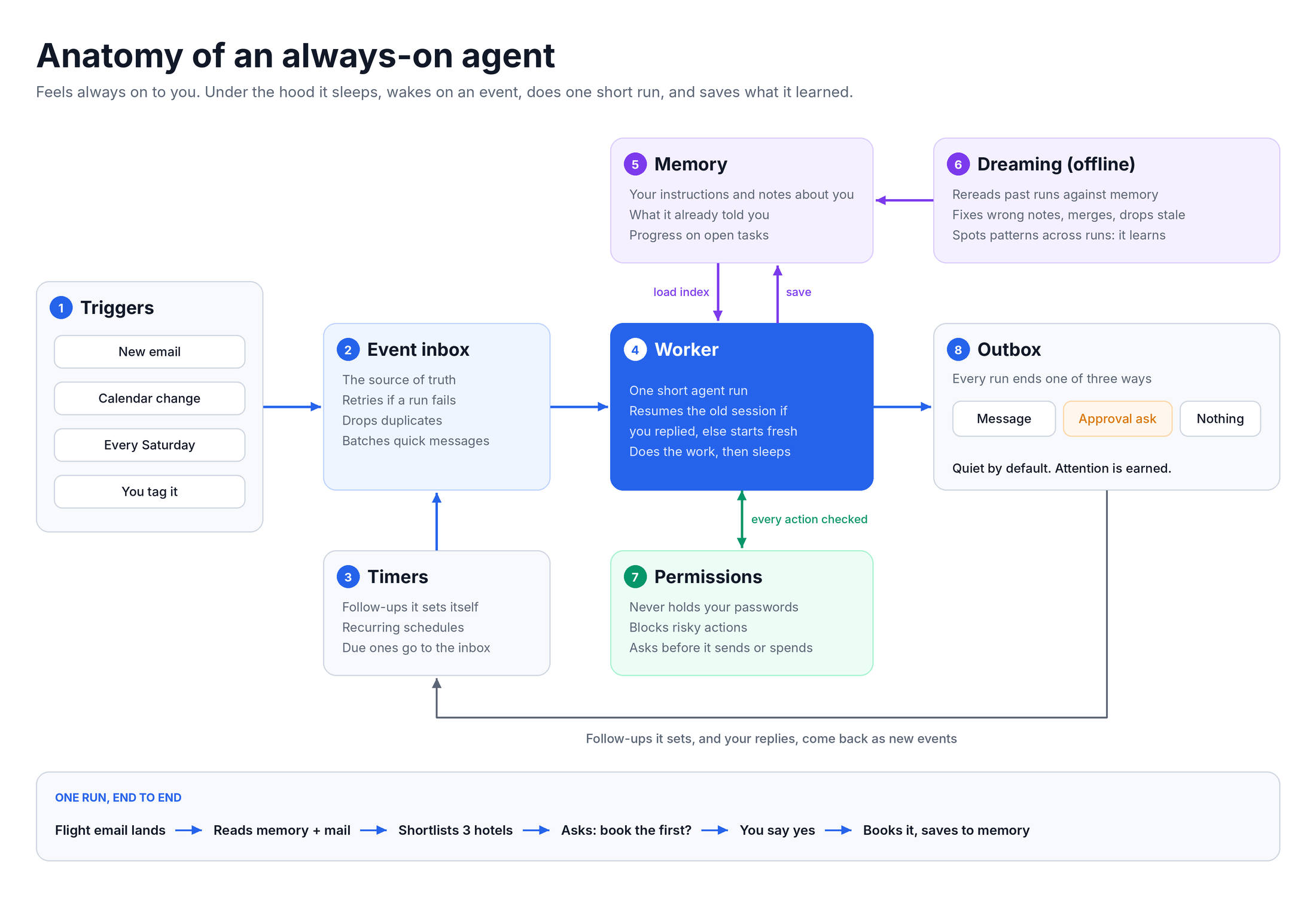
Eight building blocks (a more product-shaped take on the agent primitives). Each one is simple. The product is in how they combine.
1. Triggers
Things that wake the agent: events (a new email lands), schedules (every Saturday morning), mentions (you tag it in a chat), and follow-ups it set for itself (“check on Thursday whether the hotel is booked”). Your prompt is just one trigger among many.
2. Event inbox
Every trigger writes to one durable inbox, and that inbox is the source of truth. If a run crashes, the event is still there to retry. Duplicates are dropped by their source ID, so one email never becomes two replies. Three quick messages from you can be batched into one run instead of three.
3. Timers
Follow-ups and schedules live in their own store. A scheduler checks for anything due and drops it into the inbox. Timers never start runs directly. Everything goes through the inbox, and that one rule keeps the system predictable.
4. Worker
The worker picks up an event and starts a run: an agent session with its own transcript of messages and tool calls. If the event continues earlier work (you answered its question), it resumes that session. If it’s new, it starts fresh. Either way, the run is short, and then it stops.
5. Memory
A durable store for what the agent can’t look up anywhere else: your instructions, notes about you, what it already told you (so it doesn’t nag twice), and progress on open tasks. Only a small index loads at the start of each run. Detail is pulled in on demand. The rule of thumb: store judgment, not data. Your inbox is already searchable. The fact that you ignore promo mails from one airline is not.
6. Dreaming
An offline pass that rereads past sessions against memory. It fixes wrong notes, merges duplicates, drops stale ones, and spots patterns no single run can see, like the fact that you always book a hotel within two days of booking a flight. This is where the agent actually learns. Without it, memory slowly rots.
7. Permissions
The agent acts with your access while you’re not watching, so this layer is the product’s trust contract. Credentials sit behind a proxy, so the agent never holds your tokens. Classifiers block risky actions. And anything that matters, like sending a reply or paying for a room, becomes a deferred call: the run pauses and asks you, and your answer arrives later as a new event in the inbox. Nobody sits waiting on a spinner.
8. Outbox
Every run ends in one of three ways: a message, an approval ask, or nothing at all. Silence is a valid output, and often the right one.
How it fits together: one run
[Triggers]  email · calendar · schedule · mention
     │
     ▼
[Event inbox] ◄── [Timers] ◄── follow-ups the agent sets ◄──┐
     │                                                       │
     ▼                                                       │
[Worker] ── loads ──► [Memory]  ◄── [Dreaming, offline]      │
     │   ── checks ─► [Permissions]                          │
     ▼                                                       │
[Outbox]  message · approval ask · nothing ──────────────────┘
Say you book a flight to Goa for 12 December.
- Trigger. The confirmation email lands, and an event goes into the inbox.
- Worker + memory. The agent wakes and loads its memory index: you like staying near the beach, you have a nightly budget, and you asked it to shortlist hotels but never book without asking.
- Work. It checks your calendar and mail. No hotel yet. It shortlists three.
- Permissions. Booking spends money, so it’s a deferred call. Outbox: “Three options for Goa. Want me to book the first one?” The run ends.
- Timer. It sets a follow-up: if there’s no answer by Thursday, nudge once.
- Resume. Two hours later you reply “yes, the first one”. That’s a new event, so the same session resumes, books the room, confirms, and writes “Goa trip: hotel booked” to memory. The Thursday nudge never fires.
- Dreaming. That night, it notices this is your third trip this year where you picked the beachside option under budget, and sharpens its notes.
The same skeleton runs everything else. A Saturday newsletter digest is a schedule trigger, a read, a summary and one message. Email triage is an event trigger that drafts replies and asks before sending. An event reminder is a calendar event plus a timer: a message the evening before with what you need to prepare, and silence if you’ve already done it.
The PM view: what changes
The product surface moves from the chat box to the moment of interruption. Quality is no longer about how good the answer to a prompt is. It’s whether the agent picks the right moment, says the right thing, and stays out of the way the rest of the time.
What I’d measure:
- Event to action time: how fast the agent turns a signal into something useful.
- Loops closed without the user: outcomes finished end to end.
- Interrupts per useful outcome: lower is better.
- Ping action rate: how often a message leads you to do something.
- Wrong-action rate: anything sent, booked or said that you had to undo.
A great always-on agent is mostly invisible. You notice it in two moments: when it saves you, and when it should have stayed quiet.
Sources
- Anthropic, “Building always-on agents”
- Anthropic, “Components of agent memory”