Table of Contents
Open Table of Contents
Introduction
If you are building AI products, inference engineering becomes relevant much earlier than most people expect. At first, the focus is usually on model quality, prompts, and demos. But once something starts becoming a real product, a different set of questions starts showing up:
- Why is the first token slow?
- Why does prompt length suddenly affect user experience?
- Why does one deployment option look cheap in a prototype and expensive in production?
- Why does a model work fine in one environment and fail in another?
- What should product and engineering teams actually measure?
Those are inference engineering questions. This is a practical PM field note and the goal is to understand what happens behind the scenes when you call an LLM (i.e. inference) and how to make better product and platform decisions, backed by a simple Gemma 4 12B experiment on Google Colab T4 GPU instance.
YouTube walkthrough
What is inference engineering?
At a high level, inference engineering is the discipline of serving models well in real products.
An LLM is not a normal web service. When a user sends a prompt, the system has to load model weights, process input tokens, build attention state, store KV cache, and generate output one token at a time. That is why inference is not just an infrastructure problem. It is also a product and business problem.
Why technical PMs should care
There are three practical reasons this matters.
1. It directly affects product experience
Users do not experience your model as a benchmark. They experience it as responsiveness, reliability, and quality under constraints.
If the first token is slow, the product feels slow. If prompts are too large, cost rises and latency gets worse. If hardware is poorly matched to the workload, unit economics break. Inference engineering sits directly in that loop.
2. It changes model and platform decisions
Open models will likely play a role similar to open source software. They may not replace every closed model, but they will matter in the stack. That makes serving tradeoffs a product judgment problem, not just an engineering one.
3. Most real products will end up multi-model
The right model depends on the task and the environment.
A lightweight model on a phone, a stronger coding model on a laptop, a larger model in production, and another one on an edge device can all be part of the same architecture.
That means teams need to understand how inference changes across hardware, memory budgets, context length, and latency requirements.
What happens during inference 101
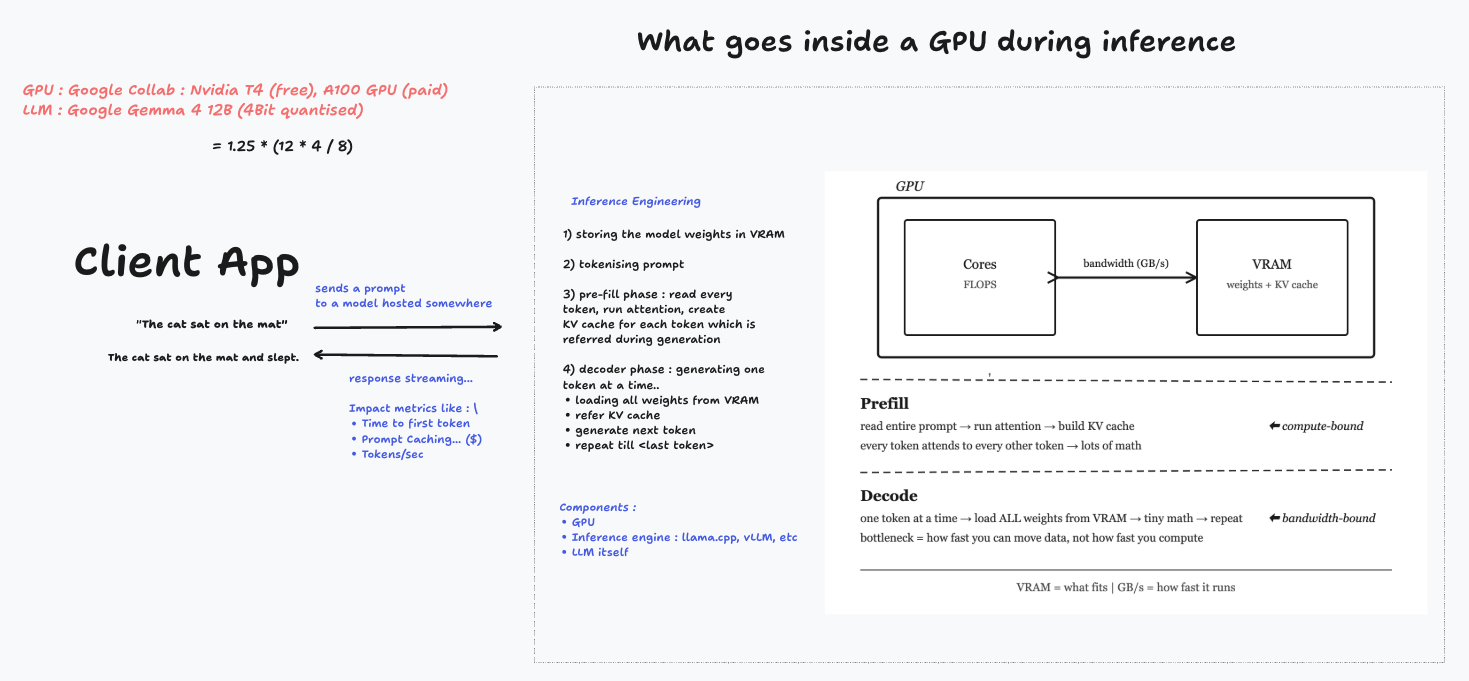
One clean way to think about inference is this:
- A client sends a prompt.
- The prompt is tokenized.
- The model weights are read from VRAM.
- The system runs a prefill pass on the input tokens.
- The decoder begins generating output tokens one by one.
That sequence is simple, but it explains a lot of product behavior.
Model weights live in VRAM
A large fraction of GPU memory is consumed just by storing the model.
In this experiment, I used Gemma 3 12B with 4-bit quantization. A rough estimate puts the model weights around 6 GB, with actual usage landing a bit higher once runtime overhead and quantization metadata are included.
That estimate is useful even if you are not implementing the stack yourself. It helps you quickly judge whether a deployment path is plausible.
Prefill and decode are different phases
This is one of the most useful ideas in inference engineering.
The prefill phase processes the input prompt. Each input token adds to attention computation and the key-value cache stored for later reuse.
The decode phase is what most people experience as generation. It predicts one token at a time after prefill is done.
These phases stress the system differently:
- Prefill is heavily influenced by prompt length and compute.
- Decode speed is more tied to token-by-token generation dynamics and memory movement.
This is why “the model feels fast” is not a single metric.
The three practical resources to watch
If you want a compact operational view, I would watch these three:
VRAM: Can the model and its runtime state fit?Compute: How quickly can the system process the prompt, especially during prefill?Memory bandwidth: How efficiently can the system move data during generation?
These are not just engineering metrics. They shape product feasibility.
If VRAM is insufficient, the model does not fit cleanly. If compute is weak, prefill slows down and first-token latency rises. If bandwidth is constrained, generation throughput suffers.
KV cache is not a side detail
KV cache is central to how inference works efficiently.
When the model processes input tokens, it stores attention-related state in GPU memory. That cache grows with prompt length, which is one reason long-context workloads get expensive or slow.
This also explains why prompt caching matters in production. If a shared prefix is reused across requests, the system can avoid recomputing the same work, improving both latency and cost.
The practical experiment: Gemma 3 12B on a Google Colab T4 GPU
The second half of the session moved from theory to a simple experiment. I used a free Tesla T4 GPU in Google Colab and loaded a 4-bit quantized Gemma 3 12B model through the Hugging Face stack.
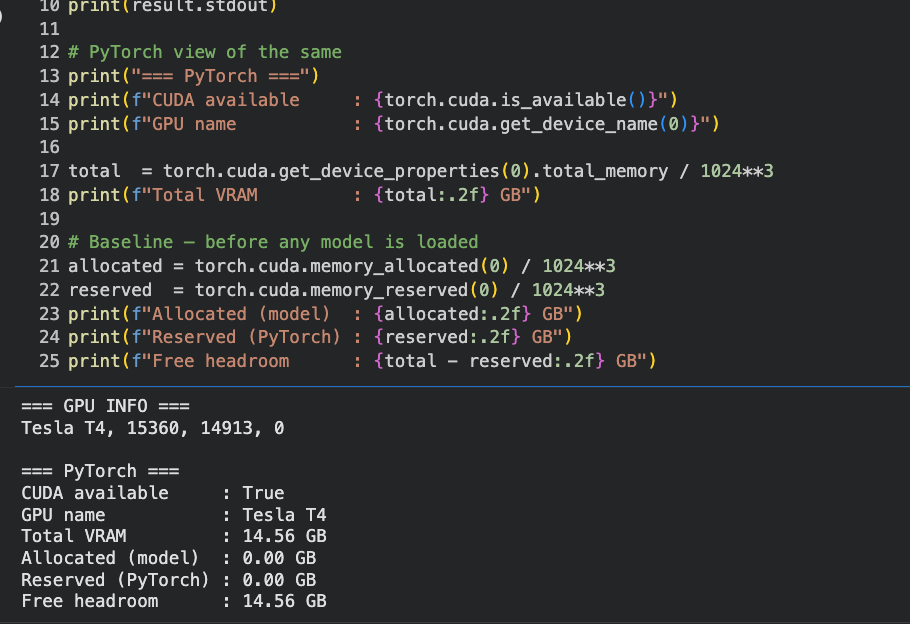
The setup helped answer a few grounded questions that PMs should care about:
- How much VRAM gets consumed before any real user traffic arrives?
- What does time to first token look like on a modest GPU?
- How many tokens per second do we get after generation starts?
- What changes when prompt length increases?
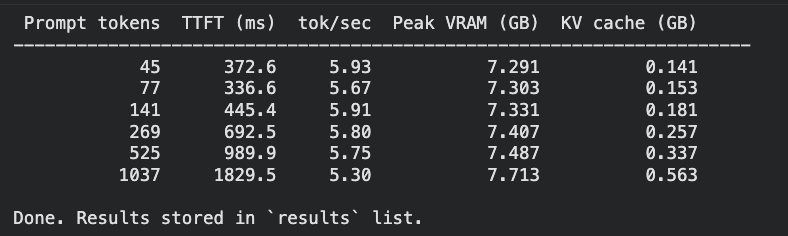
The numbers were directionally clear:
- The model occupied roughly half of the T4’s available VRAM after load.
- Time to first token was noticeably sensitive to prompt length.
- Tokens per second stayed relatively stable compared to TTFT.
- KV cache grew as the prompt got longer.
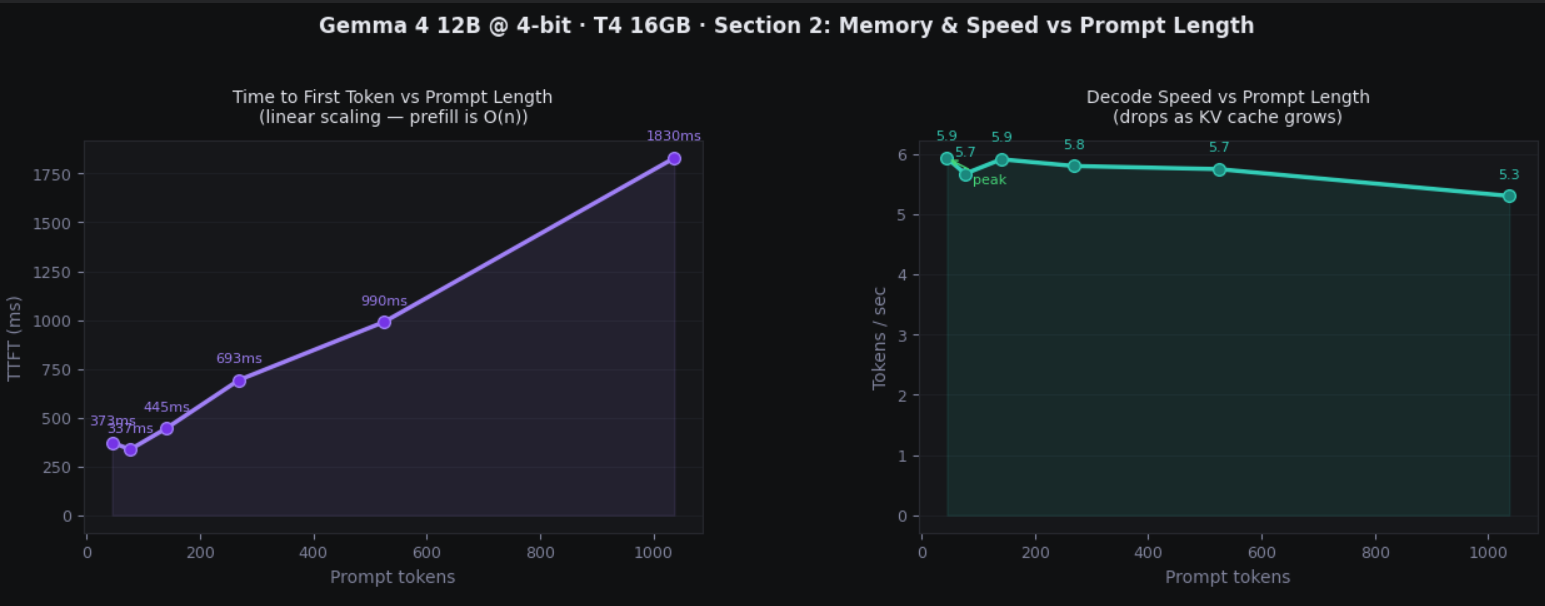
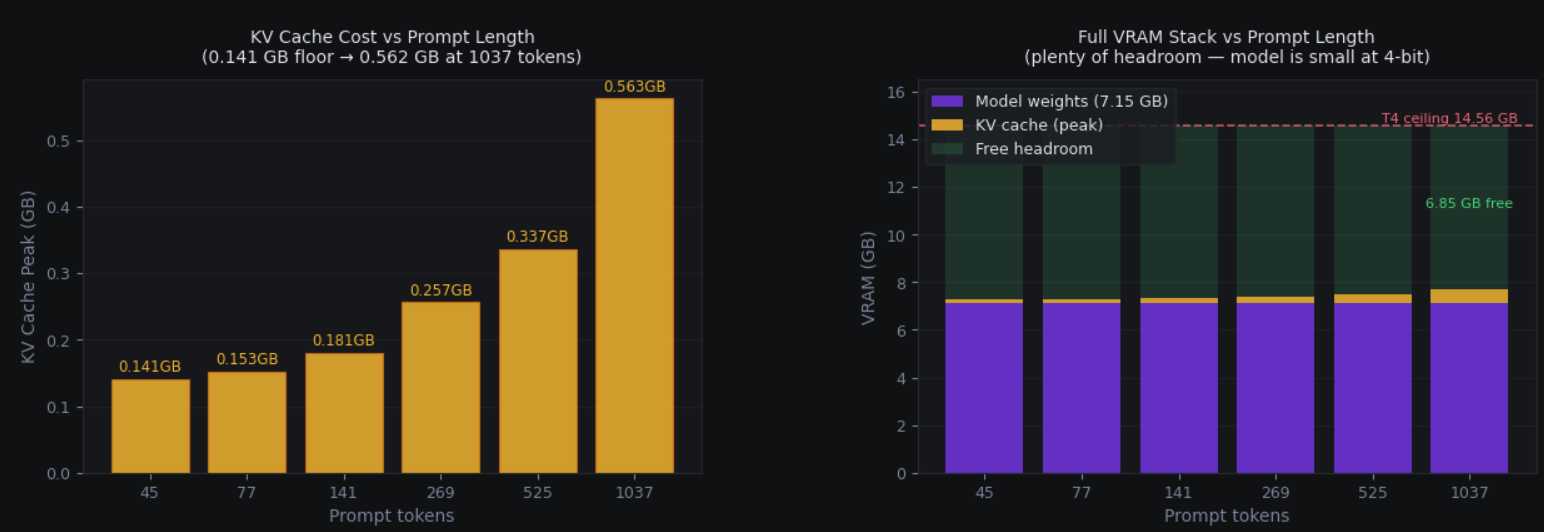
That is exactly the kind of pattern worth internalizing if you are making roadmap or platform decisions.
Important takeaways
As prompt length increased, time to first token increased roughly linearly, while tokens per second stayed relatively flat.
This is a useful PM anchor. It tells us:
- Long prompts hurt responsiveness before generation starts.
- Prompt optimization is not just about saving tokens, it is about reducing prefill cost.
- User-perceived latency often comes from earlier in the pipeline than people assume.
If you are building an LLM feature, this has immediate product implications. A system can feel slow even when decode speed is acceptable, simply because the prompt is doing too much work upfront.
A simple checklist for technical PMs
When I look at an LLM workload now, I try to ask:
- What model are we serving?
- On what hardware?
- What precision are we using?
- How large are the prompts?
- How much KV cache growth should we expect?
- Is the bottleneck prefill, decode, or memory fit?
- Can prompt caching or architecture changes reduce waste?
That set of questions gets you much closer to real understanding than a generic “the model feels slow.”
It also leads to better conversations with engineering teams. Instead of asking only for eval scores, you start asking:
- What is our time to first token?
- How does it change with context length?
- What is our effective throughput?
- What is driving cost most right now?
- Which part of the stack is actually the bottleneck?